

External API Configuration Guide
You can create API request definitions in the API-Anfragen tab of the voice wizard. Click on “API-Anfrage hinzufügen” and you’ll see the following input form with the fields explained below.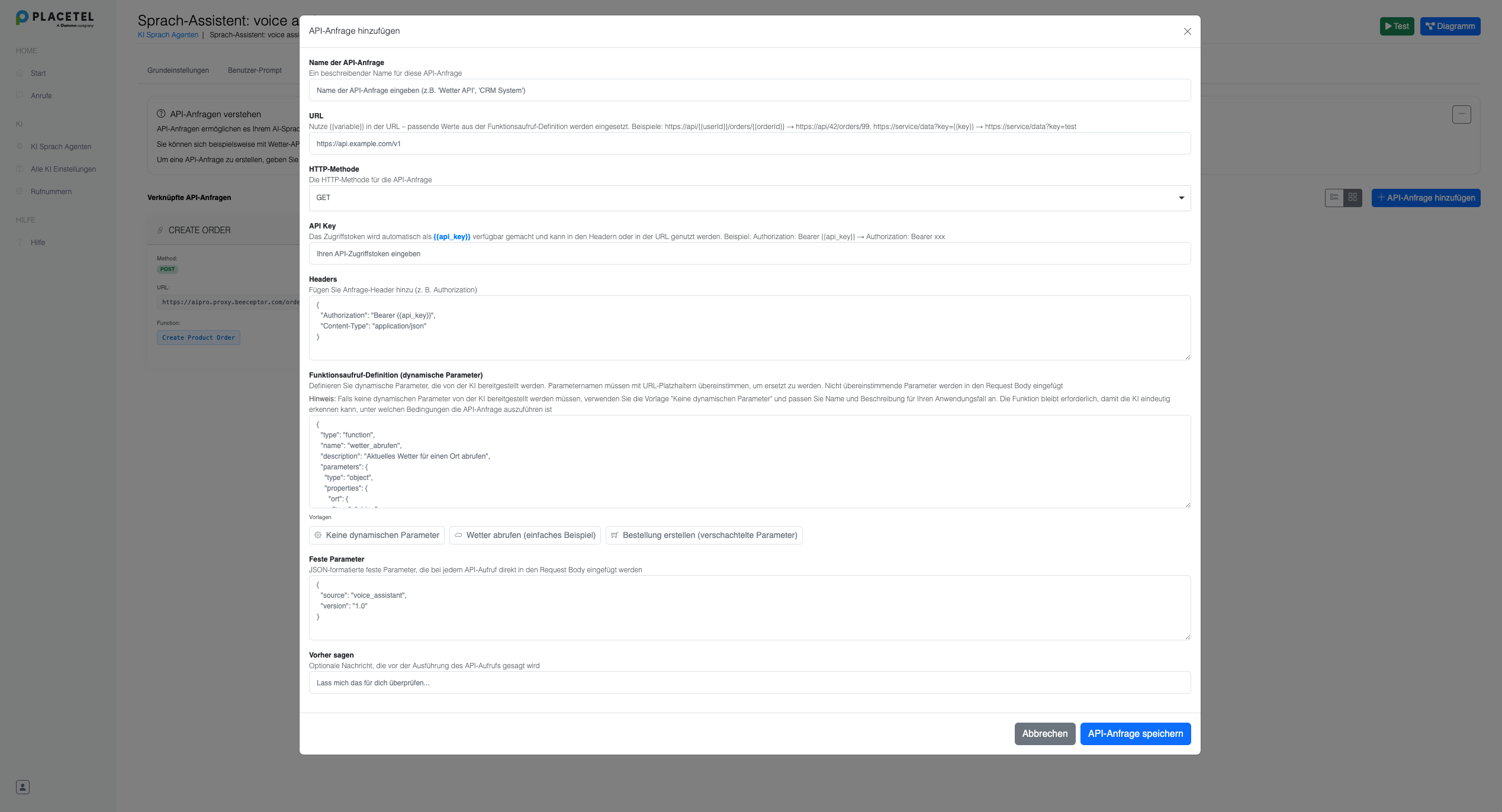
Form Fields Explained
Name der API-Anfrage
A descriptive name for your API request (e.g., “Create Product Order”)URL
The API endpoint URL. You can use placeholders like{{userId}} that will be replaced with values from your dynamic function parameters.
- Example:
https://api.shop.com/orders/{{userId}}
HTTP-Methode
Choose the HTTP method for your request (GET, POST, PUT, DELETE, etc.)API Key
Your authentication token. This will automatically replace any{{api_key}} placeholders in your URL or headers.
Headers
HTTP headers for your request in JSON format:{{api_key}}will be replaced with your API Key
Function Definition (Dynamic Parameters)
Define the parameters that users can pass when calling your function:- Replace matching placeholders in URL and headers
- Any dynamic parameters not matched with any placeholders will be included in the request body
- Works with nested objects - e.g., `orderDetails“ object will be preserved in the body
Fixed Parameters
Static values that are always included in every request:- Always be included in the request body as-is
- They do NOT replace placeholders in headers or URL
Vorher sagen
An optional message that the AI assistant will tell the user before executing the API request. For example: “I’m creating your order now…” or “One moment, I’m retrieving the product information…”Example: GET Request Without Dynamic Parameters
Some API calls don’t need parameters from the AI - for example “Get all products”. In this case, a function definition is still required so that the AI triggers the API request.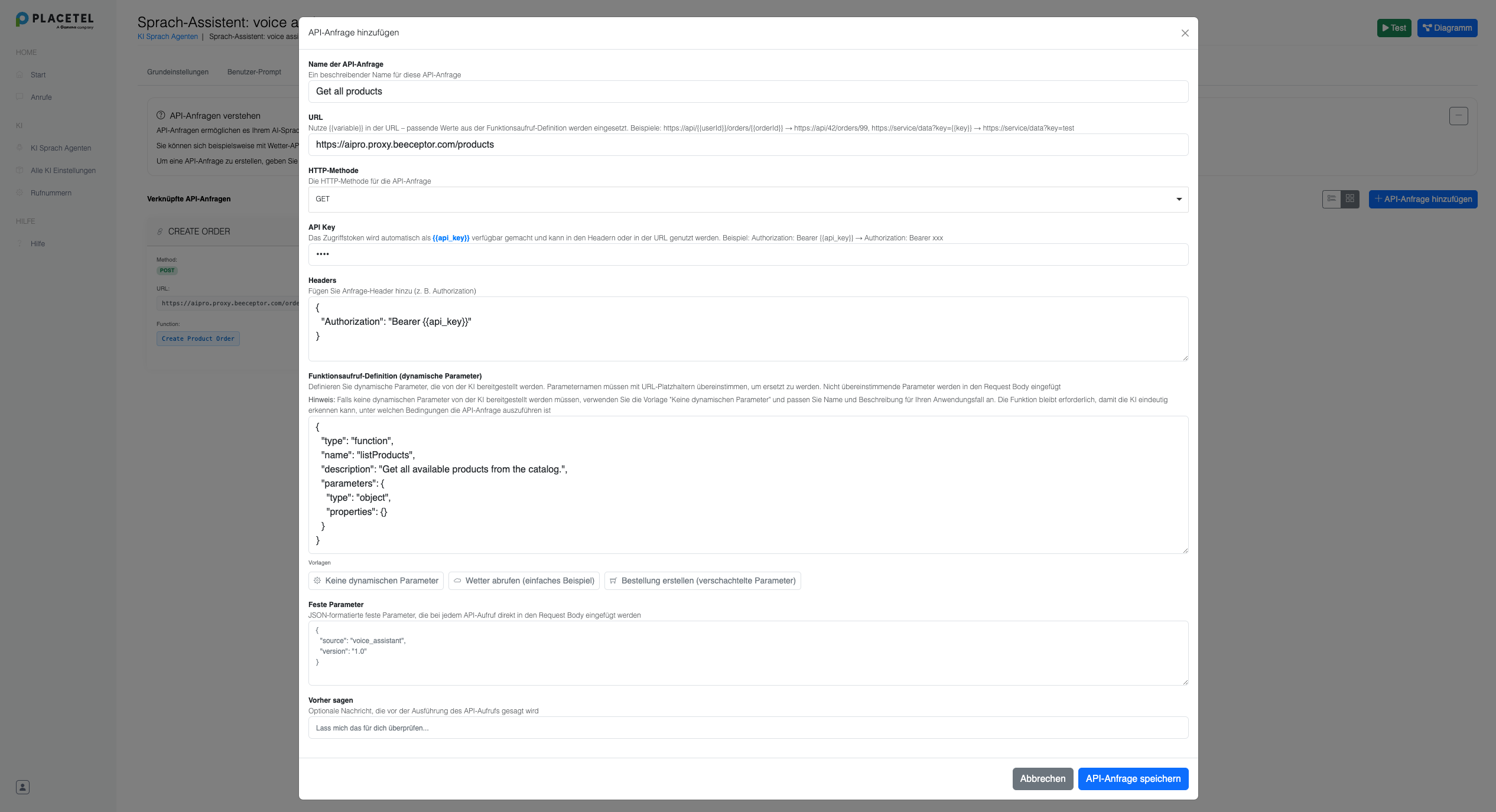
Configuration for “Get all products”:
- Name der API-Anfrage: “Get all products”
- URL:
https://aipro.proxy.beeceptor.com/products - HTTP-Methode: GET
- API Key: (empty or your API key)
- Headers: Standard GET headers
Function Definition Without Parameters:
Click on “Keine dynamischen Parameter” to get a template:- A meaningful function name and description are critical because the AI must understand when to call the function
- Add explicit instructions in the User Prompt if the AI has trouble
- The empty
properties: {}are required for a valid function definition
Resulting HTTP Request:
Based on the configuration above, the following HTTP request will be created:- URL: Direct URL without placeholder replacements
- Headers: GET headers with Bearer API token
- Parameters: No dynamic parameters required
How the Final Request is Built
- URL: Placeholders replaced with dynamic function parameters
- Headers:
{{api_key}}→ API Key, other placeholders → dynamic parameter values - Body: Combination of Fixed Parameters + dynamic parameters not matched with any placeholders
Example Final HTTP Request
Based on the parameters above, the following HTTP request will be built:- URL:
{{userId}}was replaced with “user123” - Headers:
{{api_key}}was replaced with your actual API key - Body: Contains both fixed parameters (storeId, paymentMethod, currency) and dynamic parameters (orderDetails)